Support replies in one voice
Run this shortcut without leaving the app where you are writing.
Brand Voice
A brand voice consistency tool for any app. Select a draft, run a shared shortcut, and review a rewrite shaped by your approved voice guide.
Run this shortcut without leaving the app where you are writing.
Run this shortcut without leaving the app where you are writing.
Run this shortcut without leaving the app where you are writing.
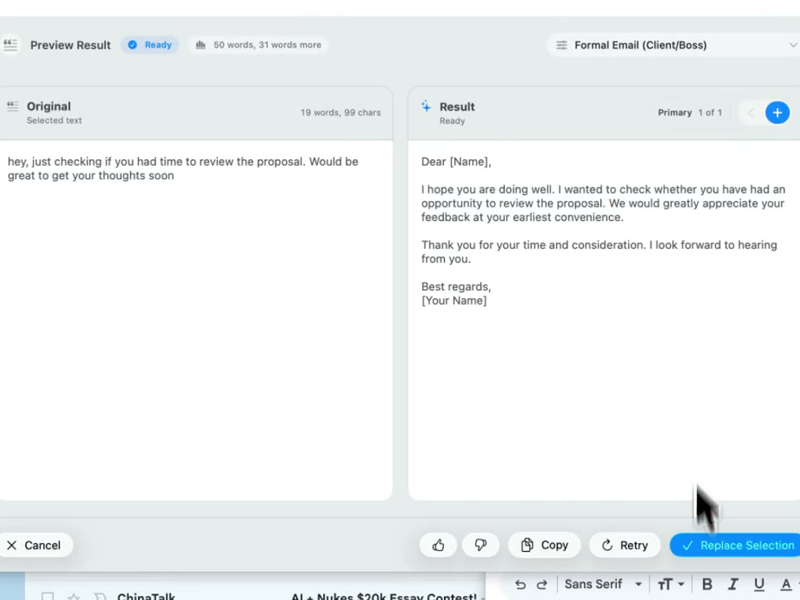
Choose a shortcut, review the rewrite, and replace the selected text without leaving your app.
Choose a shortcut, review the rewrite, and replace the selected text without leaving your app.
Choose a shortcut, review the rewrite, and replace the selected text without leaving your app.
Zendesk reply — "On-brand support reply" shortcut, source: Notion "Voice & tone" guide
Cmd/Ctrl Shift PBefore
Hi, unfortunately that's not something the platform supports at this time :( You could maybe try exporting everything as a CSV and re-importing it? So sorry for the inconvenience!!
After
There's a working path for this today: export the project as CSV, then re-import it into the new workspace — tags and assignees come along, and it takes about five minutes. Direct workspace-to-workspace transfer isn't supported yet; I've added your vote so the team sees the demand.
Renewal email in Gmail — a new account manager, week one, same shortcut, same guide
Cmd/Ctrl Shift PBefore
Hey!! Just wanted to touch base about your renewal coming up!! We have some really exciting new features I'd LOVE to show you. Let me know if you have any questions at all, I'm always here!
After
Your annual plan renews soon, so two things shipped this year are worth knowing about: shared style libraries and document-grounded rewrites, both included in your current tier. If a 20-minute walkthrough before the renewal date would help, I'll set one up. Otherwise no action is needed — the renewal happens automatically.
Product update in Slack #announcements — "Company announcement" shortcut, source: Confluence comms playbook
Cmd/Ctrl Shift PBefore
hey everyone, super excited to announce we finally shipped the new permissions thing 🚀🚀 huge shoutout to the platform squad who really crushed it, this was a massive lift. anyway customers have been asking forever so this is huge, docs are coming soon
After
Shipped: granular workspace permissions — the most-requested admin feature of the year. Owners can now scope member access per project. Available to all customers today; docs land later this week. Credit to the platform team, who carried a genuinely heavy lift. Customer-facing folks: the one-line pitch is "invite anyone, control exactly what they see."
Start with 30 free rewrites a month. Pro adds unlimited rewrites for one writer. Team adds shared shortcuts, workflows, and company context.
For trying the workflow
Select, rewrite, and replace text in any app, with 30 rewrites each month.
For one active writer
$15 billed monthly
Unlimited rewrites for your own styles, workflows, and dictation.
For shared voice and policy
$25 billed monthly. Starts at 2 seats.
Your company's approved language, one hotkey away for everyone.
Rolling this out to a support or sales team? Run a 3-week pilot →
Every new account starts with a free 14-day Team trial: no card required, up to 10 trial seats, then Free plan limits unless you upgrade.
SSO/SCIM, audit logs, security review, and rollout help for 25+ seats.
FAQ
Write the draft however it comes out, then select it and press Cmd/Ctrl+Shift+P. Pick your team's brand voice shortcut and Rewrait rewrites the selection to match the voice guide attached to that shortcut — the guide's wording, structure, and level of formality — then replaces the draft in place. The guide itself stays where it already lives: a workspace owner connects Notion, Confluence, or Google Docs and approves the specific pages that define your voice. Because the shortcut is a native hotkey on Mac and Windows, the same voice applies in Zendesk, Gmail, Slack, your CRM, and your docs — not only the one tool that happens to have a plugin. Writers do not have to memorize the guide before drafting. They can write fast and messy, run the shortcut, and apply the approved voice at the end.
A workspace owner connects the integration over OAuth — read-only scopes, so Rewrait can never edit or delete anything — then searches the connected workspace and approves specific pages as writing-style sources: a voice and tone guide, a terminology list, a messaging doc. Approved sources attach to shared workspace styles and appear on the shortcut as chips, so writers can see exactly which document is shaping the rewrite. At rewrite time Rewrait fetches the live content of each attached source — up to 12,000 characters per source, cached so rewrites stay fast — and instructs the model to match its voice, structure, and terminology. Your document remains the single source of truth: nothing is copied into a separate brand profile that can drift out of date. Integration tokens are encrypted at rest, and company context sources are part of the Team plan.
The next rewrite follows the new guidance automatically — there is nothing to re-upload, re-sync, or re-train. Rewrait fetches approved sources live at rewrite time, so editing the guide in Notion, Confluence, or Google Docs updates every shortcut that references it, for every member of the workspace, at once. A short cache keeps rewrites fast, and if your docs tool is briefly unreachable Rewrait falls back to the last fetched version instead of failing the rewrite. Voice guides often go unused because applying them takes effort. Rewrait fetches the guide at the moment of writing, so a change such as "we say workspace, never account" applies to the next support reply, renewal email, or announcement.
Only workspace owners can control document access. Members can run shortcuts that use approved sources, but only owners can connect integrations, approve new source pages, or remove existing ones. The access itself is deliberately narrow: OAuth with read-only scopes, tokens encrypted at rest, and content fetched only from the specific pages an owner has explicitly approved — never the whole connected workspace. On the output side, Rewrait never trains models on your text, and rewrite history is off by default, so the drafts your team runs through shortcuts aren't stored unless someone opts in. The Team plan includes a written no-training guarantee and DPA. Teams that need SSO/SCIM, audit logs, or a formal security review are the larger-teams tier — talk to us.
Team — that's the tier built for this. It's $20 per seat per month billed annually (two months free versus the $25 monthly price) and starts at 2 seats. Team includes shared workspace styles and workflows, company context from Notion, Confluence, and Google Docs, owner-managed seats and billing, and the no-training guarantee. If you only want personal styles without company sources, Pro is $12/mo billed annually ($144/yr) or $15 monthly, with unlimited rewrites, premium models, and multilingual dictation. Free ($0, 30 rewrites a month, 1,000 characters) is enough to feel the select, hotkey, replace loop. Every new signup gets a 14-day Team trial with full features and no card, so you can connect your voice guide and test rewrites on real team drafts before choosing a plan.
Select your draft, run a shortcut, and review the rewrite before replacing it.