
Client emails that sound senior
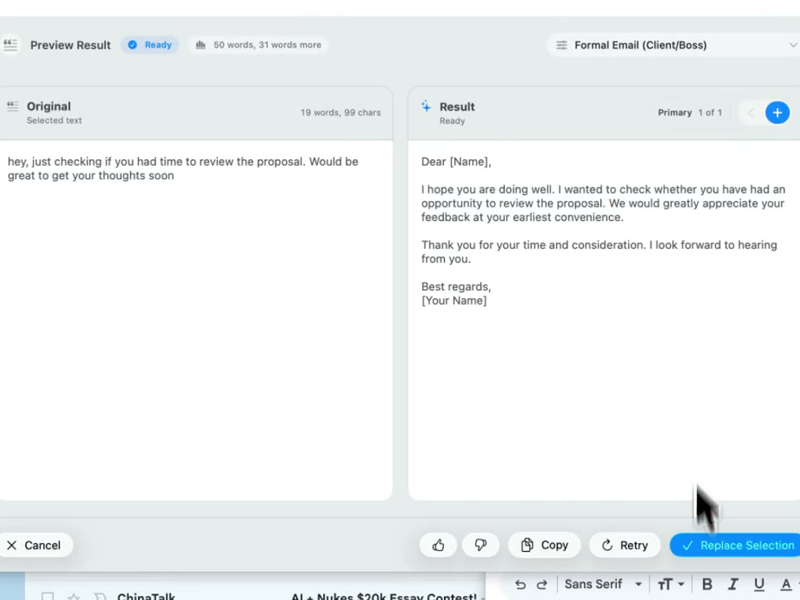
Run this shortcut without leaving the app where you are writing.
Outlook
An AI writing assistant for Outlook that runs natively on Windows and Mac. Select your draft, press Ctrl+Shift+P (Cmd on Mac), replace it — no add-in required.
Run this shortcut without leaving the app where you are writing.
Run this shortcut without leaving the app where you are writing.
Run this shortcut without leaving the app where you are writing.
Choose a shortcut, review the rewrite, and replace the selected text without leaving your app.
Choose a shortcut, review the rewrite, and replace the selected text without leaving your app.
Choose a shortcut, review the rewrite, and replace the selected text without leaving your app.
Reply-all to a director questioning your project timeline
Cmd/Ctrl Shift PBefore
we actually flagged the vendor api dependency back in april and the slip is mostly bc their api came late, not really on our side, we can still hit september if procurement signs the contract this week
After
Quick context: the slip traces to the vendor API arriving late — a dependency we flagged in April, not a delivery issue on our side. September is still achievable on one condition: procurement signs the contract this week.
The 5:55pm Friday status email to stakeholders
Cmd/Ctrl Shift PBefore
this week was mostly migration stuff, validation is like 80% done, some hiccups with duplicate records but mostly fine, next week we finish the rest, also Dana is out so the monthly report will be a few days late
After
Migration update: validation is 80% complete. A duplicate-records issue surfaced and is contained. We finish validation next week. One heads-up — Dana is out, so the monthly report will land a few days late.
Telling a client their request is a change order
Cmd/Ctrl Shift PBefore
so the custom export feature isn't in the SOW we signed, we can definitely build it but it'd be a change order and would push delivery maybe 2 weeks, let us know what you want to do
After
The custom export isn't covered by the signed SOW — but we can build it. It would be a change order and would move delivery by roughly two weeks. Want me to send over the change-order details so you can decide?
Start with 30 free rewrites a month. Pro adds unlimited rewrites for one writer. Team adds shared shortcuts, workflows, and company context.
For trying the workflow
Select, rewrite, and replace text in any app, with 30 rewrites each month.
For one active writer
$15 billed monthly
Unlimited rewrites for your own styles, workflows, and dictation.
For shared voice and policy
$25 billed monthly. Starts at 2 seats.
Your company's approved language, one hotkey away for everyone.
Rolling this out to a support or sales team? Run a 3-week pilot →
Every new account starts with a free 14-day Team trial: no card required, up to 10 trial seats, then Free plan limits unless you upgrade.
SSO/SCIM, audit logs, security review, and rollout help for 25+ seats.
FAQ
No. Rewrait works at the operating-system level on Windows and Mac, so there is no add-in to install: no AppSource listing, no admin consent in the Microsoft 365 admin center, no Exchange permissions, and nothing for IT to deploy or update. It behaves the same in new Outlook, classic Outlook, and Outlook on the web, because it acts on the text you select rather than plugging into the mail client. Select your draft, press Ctrl+Shift+P (Cmd+Shift+P on Mac), pick a style, and the rewrite replaces your selection in the compose pane. Rewrait does not connect to your mailbox. It processes only the text you select, on demand, and does not use that text to train models. That gives IT a narrower review: no mailbox access, Exchange permissions, or Outlook add-in deployment.
Yes — Rewrait ships a native Windows app through the Microsoft Store alongside the Mac app, with the same features on both. That is rarer than it should be: Apple's Writing Tools are Mac-only by definition, the recent wave of hotkey rewriters is overwhelmingly Mac-first, and most other AI writing tools live in a browser extension that never reaches the Outlook desktop app at all. If your company runs a mixed fleet — account managers on Windows laptops, designers on MacBooks — Rewrait behaves identically on both sides: the same Ctrl/Cmd+Shift+P shortcut, the same styles, and on the Team plan the same shared workspace, so an email written in Outlook on Windows sounds like one written on a Mac. Windows users get the same core features and shared workspace support as Mac users.
They solve different problems and coexist fine. Microsoft 365 Copilot is strongest inside Microsoft's own surfaces — summarizing long threads, drafting from meeting context — and is priced accordingly: $18–30 per user per month on top of a Microsoft 365 license. Rewrait does one job, rewriting the text you select in styles you saved, and does it everywhere: Outlook, but also Teams, Slack, Zendesk, your browser, and your CRM. Pro is $12 a month billed annually; Team is $20 a seat. If your company lives entirely in Microsoft products, Copilot may earn its price. If your team uses Outlook alongside tools such as Teams, Slack, Zendesk, and a CRM, Rewrait provides the same rewriting workflow across them for less. Teams can also use Copilot for mailbox tasks and Rewrait for rewriting selected text.
Everywhere you can select text. The same shortcut that rewrites an Outlook draft works in Teams chats, Word, your browser, Slack, Notepad, and any CRM or internal tool with a text field. That is the point of working at the OS level instead of shipping per-app plugins: one hotkey, one set of styles, no per-app setup, nothing that breaks when an app updates. Practically, that means the voice you use for client email carries into the Teams message that follows it, and the follow-up you type into the CRM matches both. A common pattern for email-heavy roles: Formal Email style for external mail, Native & Casual for internal chat, and Soften Tone for the reply you typed angry and shouldn't send as-is. Install Rewrait once on Windows or Mac, then use the same shortcut in any app where you can select text.
Select your draft, run a shortcut, and review the rewrite before replacing it.