Reply tone that matches the thread
Run this shortcut without leaving the app where you are writing.
Gmail
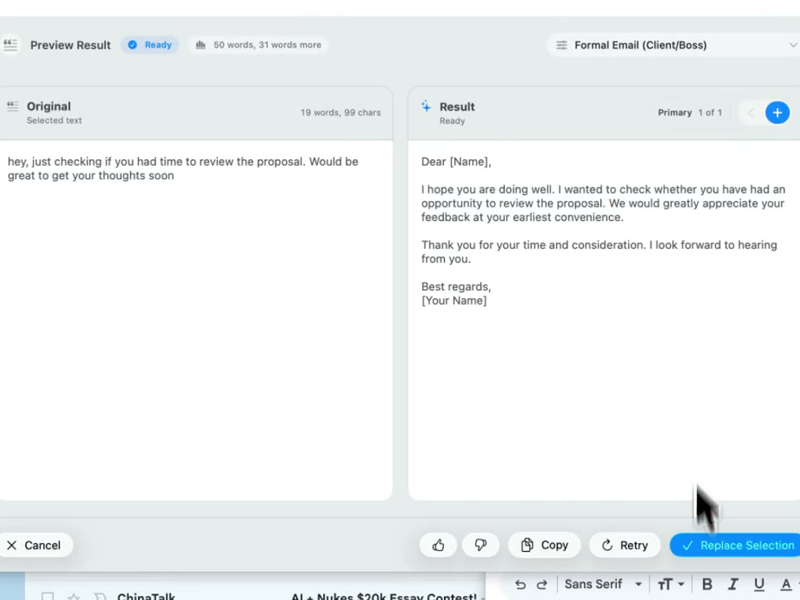
Rewrait is an AI email assistant for Gmail that rewrites the reply you already drafted. Select it in the compose window, press Cmd/Ctrl+Shift+P, replace it.
Run this shortcut without leaving the app where you are writing.
Run this shortcut without leaving the app where you are writing.
Run this shortcut without leaving the app where you are writing.
Choose a shortcut, review the rewrite, and replace the selected text without leaving your app.
Choose a shortcut, review the rewrite, and replace the selected text without leaving your app.
Choose a shortcut, review the rewrite, and replace the selected text without leaving your app.
Replying to a 23-message vendor thread about a slipped deadline
Cmd/Ctrl Shift PBefore
ok going back through this thread, I think the confusion started bc we said the 15th but the contract actually says the 15th of next month?? anyway we still need the revised SOW from your side before anything else can move, also that invoice question from before is still open
After
To reset a long thread: per the contract, the deadline is the 15th of next month, not this month. Two items are blocking progress — the revised SOW from your side, and the open invoice question from earlier. Can you send both this week?
The week-later follow-up that has to get a reply this time
Cmd/Ctrl Shift PBefore
Hi, just wanted to bump this in case it got buried — still need your signoff on the onboarding timeline so we can book the kickoff thursday, no worries if you're busy!! whenever you get a chance would be amazing
After
Following up on the onboarding timeline: it's still waiting on your sign-off, and Thursday's kickoff depends on it. Could you approve it by Wednesday so the date holds?
Saying no to a meeting without burning the bridge
Cmd/Ctrl Shift PBefore
hey sorry I don't think I can make this one, this week is crazy, maybe just send me the notes after? or we can find another time if it's important
After
Thanks for the invite — I can't make it this week. If notes are enough, please send them my way. If you need me in the room for a decision, propose another time and I'll prioritize it.
Start with 30 free rewrites a month. Pro adds unlimited rewrites for one writer. Team adds shared shortcuts, workflows, and company context.
For trying the workflow
Select, rewrite, and replace text in any app, with 30 rewrites each month.
For one active writer
$15 billed monthly
Unlimited rewrites for your own styles, workflows, and dictation.
For shared voice and policy
$25 billed monthly. Starts at 2 seats.
Your company's approved language, one hotkey away for everyone.
Rolling this out to a support or sales team? Run a 3-week pilot →
Every new account starts with a free 14-day Team trial: no card required, up to 10 trial seats, then Free plan limits unless you upgrade.
SSO/SCIM, audit logs, security review, and rollout help for 25+ seats.
FAQ
No — and it doesn't need to be. Rewrait is a native Mac and Windows app that works at the operating-system level, so it sits over any app where you can select text, including Gmail in Chrome, Safari, Firefox, or Edge. There is nothing to install from the Google Workspace Marketplace, no extension permissions to grant, and nothing connected to your Google account. When you select a draft in the compose window and press Cmd/Ctrl+Shift+P, Rewrait reads only the text you selected, rewrites it, and puts the result back in place. The same shortcut works identically everywhere else you write — Slack, your support desk, docs — so you are not maintaining a Gmail-only tool. On the Team plan, company-context integrations connect to Notion, Confluence, and Google Docs with read-only scopes; Rewrait never connects to Gmail itself.
Gmail's built-in drafting generates a new email from a prompt. Rewrait rewrites the email you already wrote — keeping your facts, names, and intent — in a style you chose: Formal Email for clients, Native & Casual for internal threads, or a custom style trained on your team's approved docs. Every rewrite also comes with variants — Warmer, Shorter, More direct — so tone is a choice you make in one click, not a regeneration lottery. And because Rewrait is a desktop layer rather than a Gmail feature, the same shortcut and the same styles follow you into Outlook, Slack, Zendesk, and everywhere else you write. If your habit is drafting three rough sentences and wishing they were a tight, on-voice reply — without re-prompting a chatbot in another tab — that is exactly the gap Rewrait fills.
Yes, with one practical note about how it works. Rewrait rewrites the text you select — it does not read the thread. So for a long thread, the move is to braindump your reply first: the decisions, facts, and asks, in any order. Select that draft, press Cmd/Ctrl+Shift+P, and run a style like Make it Concise. You get a reply that leads with the decision and lists the asks, instead of a chronological ramble that buries them. The Free plan rewrites selections up to 1,000 characters, which covers most replies; Pro and Team raise the limit to 10,000 characters — enough for the messiest end-of-quarter thread recap. Because Rewrait only sees the selection, the rest of the conversation is not sent for rewriting.
It reads only what you select, at the moment you press the shortcut. Rewrait has no Gmail integration, no inbox access, and no background scanning — it acts on the current text selection, like a smarter clipboard. Selections are processed on demand and never used to train models. Rewrite history is off by default: unless you turn it on in settings, Rewrait keeps no copy of what you rewrote. The Team plan adds a contractual no-training guarantee for the whole workspace. The integrations that power team styles — Notion, Confluence, and Google Docs — use read-only scopes and encrypted tokens, and a workspace owner approves exactly which documents are used as context. If you handle sensitive email, such as legal questions, compensation, or candidate conversations, Rewrait limits processing to the text you deliberately select instead of requiring you to paste the draft into another chat window.
Select your draft, run a shortcut, and review the rewrite before replacing it.