
Chat replies at chat speed
Run this shortcut without leaving the app where you are writing.
Intercom
An AI writing assistant for Intercom that works at chat speed. Select a reply in the inbox, press Cmd/Ctrl+Shift+P, send a message that sounds like your team.
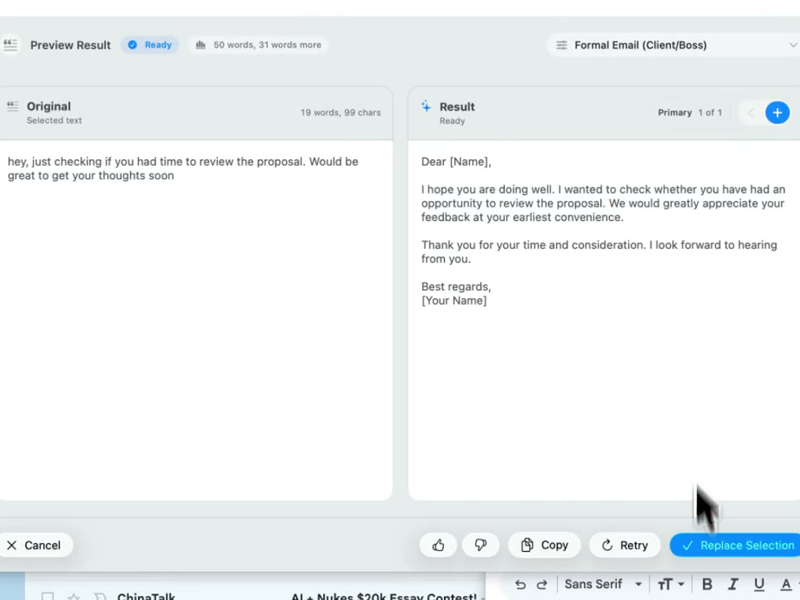
Run this shortcut without leaving the app where you are writing.
Run this shortcut without leaving the app where you are writing.
Run this shortcut without leaving the app where you are writing.
Choose a shortcut, review the rewrite, and replace the selected text without leaving your app.
Choose a shortcut, review the rewrite, and replace the selected text without leaving your app.
Choose a shortcut, review the rewrite, and replace the selected text without leaving your app.
Live chat: customer hit a renewal-date bug mid-conversation
Cmd/Ctrl Shift PBefore
yeah that's a known bug with annual plans showing the wrong renewal date, fix should ship this week, you can ignore the date, you won't get charged early or anything
After
Good catch — that's a confirmed display bug on annual plans. The renewal date you're seeing is wrong, but it's display-only: you won't be charged early. The fix is due to ship this week.
Declining a feature request without ending the conversation
Cmd/Ctrl Shift PBefore
hmm we don't support exporting to excel right now and tbh I'm not sure it's on the roadmap, you could maybe use the csv export as a workaround?
After
We don't have direct Excel export today, and I can't promise it's on the roadmap. The CSV export gets you the same data, though, and Excel opens it cleanly — want a quick walkthrough of that route?
Summary before escalating a chat to engineering
Cmd/Ctrl Shift PBefore
user can't log in on the mobile app, web works fine, tried password reset twice, started yesterday after the 3.2 update i think, they're on iphone, pretty frustrated
After
Escalating: login fails on the iOS app only — web works. Started yesterday, likely after the 3.2 update. User has already tried two password resets. Device: iPhone. Customer is frustrated; please reply in-thread so I can keep them posted.
Start with 30 free rewrites a month. Pro adds unlimited rewrites for one writer. Team adds shared shortcuts, workflows, and company context.
For trying the workflow
Select, rewrite, and replace text in any app, with 30 rewrites each month.
For one active writer
$15 billed monthly
Unlimited rewrites for your own styles, workflows, and dictation.
For shared voice and policy
$25 billed monthly. Starts at 2 seats.
Your company's approved language, one hotkey away for everyone.
Rolling this out to a support or sales team? Run a 3-week pilot →
Every new account starts with a free 14-day Team trial: no card required, up to 10 trial seats, then Free plan limits unless you upgrade.
SSO/SCIM, audit logs, security review, and rollout help for 25+ seats.
FAQ
No — Rewrait works at the operating-system level, so it sits over Intercom rather than installing into it. It works wherever your teammates write: the inbox reply composer, internal notes, and the saved-replies editor, whether you run Intercom in a browser or in its desktop app. There is nothing to add from the Intercom app store, no workspace permissions to grant, and no access to your conversation data — Rewrait reads only the text someone selects, at the moment they press Cmd/Ctrl+Shift+P. Setup is one desktop install per teammate, on Mac or Windows. The same shortcut and styles also work in follow-up emails, Slack threads, and other text fields. Your team can use the same writing styles across Intercom, email, Slack, and other tools.
Fin can resolve conversations without a human agent. Rewrait helps with the conversations agents still handle, including frustrated customers, edge cases, and refund decisions. Rewrait lets an agent type the answer fast and rough, select it, and send a version that's clear and on-voice — in seconds, at chat speed. It also covers the writing Fin never touches: internal notes, escalation summaries to engineering, the awkward we-don't-support-that message. Fin reduces how many conversations your team handles, while Rewrait helps agents improve the messages they still write.
It replaces a slower step. Watch what agents do today with a tricky reply: copy the draft, switch to a chatbot tab, paste, prompt, wait, copy, switch back, paste, fix the formatting. Rewrait collapses all of that into select, Cmd/Ctrl+Shift+P, pick, replace — without leaving the conversation, in a few seconds. Variants make tone a single choice rather than a rewrite loop: every result comes with Warmer, Shorter, and More direct alternatives, which maps neatly onto chat's three recurring needs. For the longest answers, Pro and Team also include multilingual voice dictation: speak the rough explanation, get clean text, then rewrite it on-voice — often faster than typing when an agent is walking through complex troubleshooting. The workflow removes the copy, paste, prompting, and tab-switching required by a separate chatbot.
That is specifically what the Team plan is for. Tone drift on chat teams usually isn't a training failure — it's that every agent carries a private sense of friendly-but-professional, and at 3am with a queue, the private sense wins. Workspace styles replace it with a shared one: the support lead defines styles like Chat reply or Saying no kindly, optionally backed by your actual voice guide in Notion, Confluence, or Google Docs, and every agent on every shift rewrites with the same styles under the same hotkey. New hires can use the same approved styles as tenured agents from their first week. Team is $20 per seat per month billed annually, $25 monthly, and starts at 2 seats. The 14-day free Team trial (no card) is enough to run one full shift rotation and compare transcripts before and after.
Select your draft, run a shortcut, and review the rewrite before replacing it.