
Bug reports with clear reproduction steps
Run this shortcut without leaving the app where you are writing.
Linear
An AI writing assistant for Linear: turn rough notes into clean bug reports, issue descriptions, and status updates with one hotkey, right inside the issue.
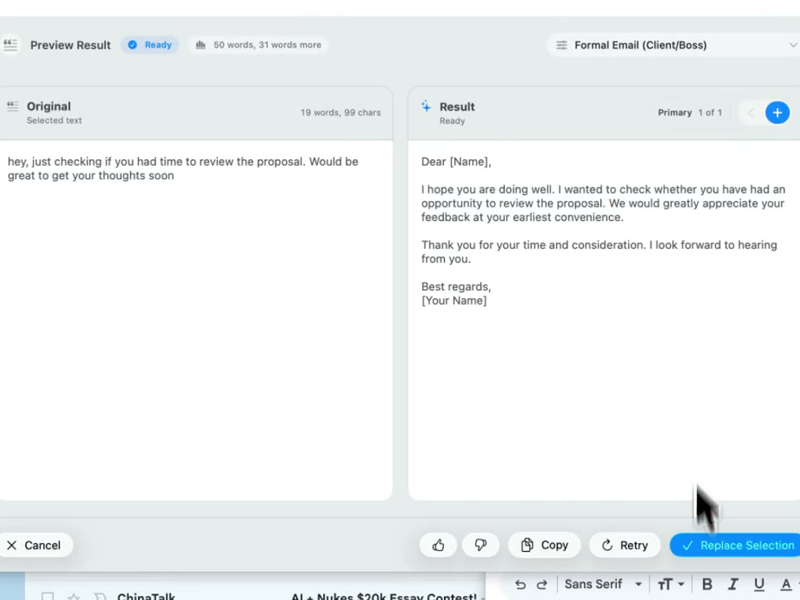
Run this shortcut without leaving the app where you are writing.
Run this shortcut without leaving the app where you are writing.
Run this shortcut without leaving the app where you are writing.
Choose a shortcut, review the rewrite, and replace the selected text without leaving your app.
Choose a shortcut, review the rewrite, and replace the selected text without leaving your app.
Choose a shortcut, review the rewrite, and replace the selected text without leaving your app.
Bug report typed 30 seconds after finding the bug
Cmd/Ctrl Shift PBefore
search is broken again?? typing anything with a quote character throws a 500, pretty sure it's the new parser, happens on staging too, super annoying
After
Search returns a 500 for any query containing a quote character. Reproduces on staging and production. Suspected cause: the new query parser. Repro: open search, enter a term with an apostrophe, submit.
Issue description for work only you understand so far
Cmd/Ctrl Shift PBefore
we need to redo cache invalidation for workspaces bc switching workspaces shows stale styles until you refresh, last sprint's fix only covered personal styles
After
Problem: switching workspaces shows stale styles until a manual refresh. Last sprint's fix covered personal styles only; workspace styles are still not invalidated on switch. Scope: invalidate workspace-scoped style caches on workspace change. Done means switching shows current styles with no refresh.
Friday project update on a slipping milestone
Cmd/Ctrl Shift PBefore
auth migration is taking longer than planned, the sso edge cases are gnarlier than we scoped, probably another week, everything else on the project is fine
After
Auth migration: about one week behind — the SSO edge cases turned out larger than scoped. Everything else on the project remains on track. New estimate: one additional week.
Start with 30 free rewrites a month. Pro adds unlimited rewrites for one writer. Team adds shared shortcuts, workflows, and company context.
For trying the workflow
Select, rewrite, and replace text in any app, with 30 rewrites each month.
For one active writer
$15 billed monthly
Unlimited rewrites for your own styles, workflows, and dictation.
For shared voice and policy
$25 billed monthly. Starts at 2 seats.
Your company's approved language, one hotkey away for everyone.
Rolling this out to a support or sales team? Run a 3-week pilot →
Every new account starts with a free 14-day Team trial: no card required, up to 10 trial seats, then Free plan limits unless you upgrade.
SSO/SCIM, audit logs, security review, and rollout help for 25+ seats.
FAQ
No. Rewrait does not connect to your Linear workspace. Rewrait is a native Mac and Windows app that works at the operating-system level, so it works over Linear's desktop app and Linear in the browser the same way: select text in an issue description, a comment, a project update, or a document, press Cmd/Ctrl+Shift+P, and replace it with the rewrite. There is no API key, no OAuth grant, no webhook, and no access to your issues — Rewrait sees only the text you select, when you select it. That also means it isn't limited to Linear: the same shortcut cleans up the GitHub PR description linked from the issue, the Slack message announcing the fix, and the customer-facing changelog entry. One writing layer across the whole loop, with no integrations to maintain.
It restructures; it doesn't decorate. Rewrait ships with Tech Professional as a default style, built for exactly this kind of writing: it turns a stream-of-consciousness bug note into problem, repro, and scope — preserving your URLs, code references, and markdown instead of paraphrasing them away. It does not add enthusiasm, adjectives, or an AI-flavored closing sentence. If the result is still too long, the Shorter and More direct variants are one click away. Nothing is sent or saved automatically: you see the rewrite next to your draft and replace only if it's better. The engine's contract is to output only the transformed text — no preamble, no chat-style commentary. You already know what the issue should say. Rewrait turns the rough note into a description the assignee can act on.
Rewrait is designed to preserve markdown, links, inline code, and placeholders during a rewrite, so a reproduction list stays a list and an error string stays verbatim. Because it replaces your selection as plain text, it plays fine with Linear's markdown shortcuts and renders normally once inserted. The practical workflow: write the rough issue with whatever structure you'd naturally use — a few bullets, a pasted error, a link to the PR — select it all, and run Tech Professional. The rewrite comes back with the same structural elements, organized and tightened. If you select only one paragraph of a longer description, only that paragraph changes; the rest of the issue is untouched, because Rewrait never sees it. And since you review before replacing, a bad rewrite costs one keystroke to discard, not a mangled issue.
Yes — that is the Team plan's core job. Create workspace styles like Bug report, Spec section, or Status update, and everyone — engineers, PMs, the designer who files one issue a month — rewrites with the same definitions under the same hotkey. Styles can pull approved context from Notion, Confluence, or Google Docs: if your engineering guidelines doc says updates must lead with status and date, rewrites come out that way without anyone re-reading the doc. Multi-step workflows can combine actions such as structuring text as a bug report and then tightening it to 100 words, all under one shortcut. Team is $20 per seat per month billed annually ($25 monthly), starts at 2 seats, and every signup starts with a 14-day free Team trial, no card, which is enough to test shared issue styles with one squad and compare the resulting reports.
Select your draft, run a shortcut, and review the rewrite before replacing it.