Monthly investor updates
Run this shortcut without leaving the app where you are writing.
For Founders
Investor updates, board follow-ups, and hard customer emails, rewritten in place on Mac and Windows. Rewrite history is off by default, and your text is not used to train models.
Run this shortcut without leaving the app where you are writing.
Run this shortcut without leaving the app where you are writing.
Run this shortcut without leaving the app where you are writing.
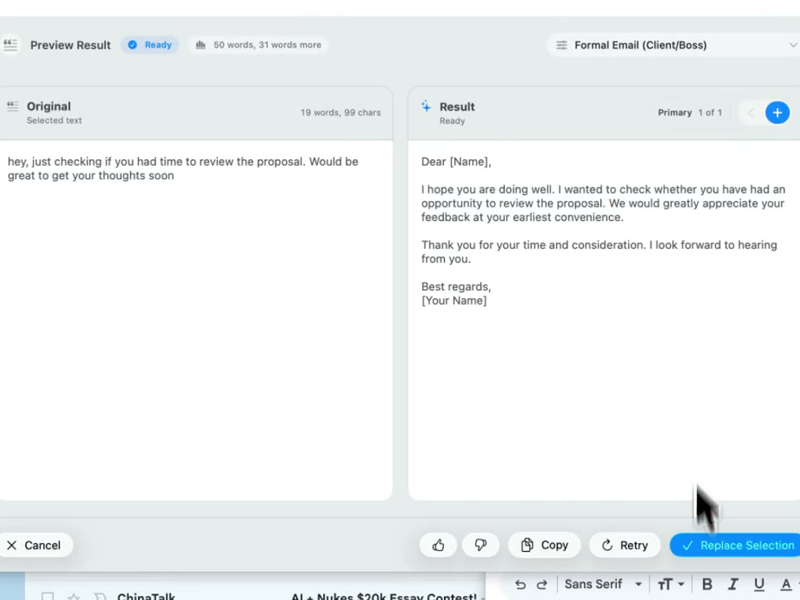
Choose a shortcut, review the rewrite, and replace the selected text without leaving your app.
Choose a shortcut, review the rewrite, and replace the selected text without leaving your app.
Choose a shortcut, review the rewrite, and replace the selected text without leaving your app.
Monthly investor update in Gmail — "Investor update" shortcut
Cmd/Ctrl Shift PBefore
so revenue went up again 41k mrr which is about 9% over last month, churn was worse tho, mostly that one big logo leaving which sucked, hiring is still slow, no founding engineer yet, runway is fine like 19 months at current burn
After
Revenue: $41k MRR, up 9% MoM. Churn: worse this month, driven by the loss of one large logo — the rest of the base held. Hiring: the founding-engineer search is still open and slower than I'd like. Runway: ~19 months at current burn.
Reply to an enterprise customer after an outage — "Hard customer reply" shortcut
Cmd/Ctrl Shift PBefore
Look, I get the frustration but the outage was actually our hosting provider failing over wrong, not something we did, and we were on it the whole time. 4 hours is also not that bad for something like this honestly. We're adding extra monitoring so it shouldn't happen again, I can also credit this month if that helps? Happy to jump on a call.
After
You're right to be angry — four hours of downtime is unacceptable, whatever the root cause. What happened: our hosting provider failed over incorrectly. We were on it from the first alert, and we're adding independent monitoring so this failure mode can't repeat silently. I've credited this month's invoice in full. If you want to walk through the timeline together, I'll make time this week.
Strategy note in Slack before the all-hands — "Company announcement" shortcut
Cmd/Ctrl Shift PBefore
hey all quick heads up we're pausing the self serve tier for now, the economics just don't work, support load is super high and almost all the conversion is coming from mid market anyway, more details in the doc and we'll talk thursday at the all hands, and to be clear nobody is losing their job this is about focus
After
Team — we're pausing the self-serve tier. The reasons: the unit economics don't work, support load is high, and nearly all conversion comes from mid-market. Details are in the doc below; please read it before Thursday's all-hands and bring questions. To be clear: no roles are affected. This is a focus decision — we're putting everything behind the motion that's working.
Start with 30 free rewrites a month. Pro adds unlimited rewrites for one writer. Team adds shared shortcuts, workflows, and company context.
For trying the workflow
Select, rewrite, and replace text in any app, with 30 rewrites each month.
For one active writer
$15 billed monthly
Unlimited rewrites for your own styles, workflows, and dictation.
For shared voice and policy
$25 billed monthly. Starts at 2 seats.
Your company's approved language, one hotkey away for everyone.
Rolling this out to a support or sales team? Run a 3-week pilot →
Every new account starts with a free 14-day Team trial: no card required, up to 10 trial seats, then Free plan limits unless you upgrade.
SSO/SCIM, audit logs, security review, and rollout help for 25+ seats.
FAQ
It depends entirely on the tool's defaults, so here are Rewrait's. Your text is processed on demand to produce the rewrite and is never used to train models. Rewrite history is off unless you explicitly opt in — the content of your drafts is not stored, so there is no archive of investor updates sitting on a server. Feedback events never store text either. If you connect documents (Notion, Confluence, Google Docs), the OAuth scopes are read-only and the tokens are encrypted at rest. Before pasting sensitive material into any chatbot, check its storage and data-retention settings. Team plans add a written no-training guarantee and a DPA; if your counsel needs SSO/SCIM or audit logs, that's the larger-teams tier — talk to us.
Rewrait reduces friction, keeps shortcuts consistent, and leaves rewrite history off by default. The chatbot loop means leaving Gmail, pasting the draft, prompting, copying it back, and fixing the formatting. Rewrait lets you select, press Cmd/Ctrl+Shift+P, and replace without leaving the app. Saved shortcuts such as "Investor update" and "Hard customer reply" apply the same standards each time, variants adjust tone in one click, and multi-step workflows chain edits you would otherwise re-prompt. Rewrait does not use your text to train models. Use a chatbot to explore a problem. Use Rewrait to revise the draft already in front of you.
Pro ($12/mo billed annually, $15 monthly) covers solo writing: unlimited rewrites, 10,000 characters, premium models, multilingual dictation, unlimited personal styles and workflows, and API access. Choose Team when at least two people need shared rewrites grounded in your company documents. Team starts at 2 seats and lets you connect Notion, Confluence, or Google Docs and approve pages like your messaging doc or last quarter's update as context sources, so everyone's shortcuts match the same voice and terminology. Two seats cost $40/mo billed annually ($50 monthly) and include the written no-training guarantee. Take the 14-day Team trial at signup (full features, no card), connect one document, and test the shared workflow before choosing a plan.
Yes — through styles you define, not through surveillance. A personal style is a saved set of instructions in your own words: short sentences, numbers first, no adjectives, one ask per email, never say "exciting." Save it once as a shortcut and every rewrite follows it. Pro includes unlimited personal styles plus multi-step workflows — tighten the draft, then format it as a bulleted update, in one keystroke — and every rewrite offers Warmer, Shorter, and More direct variants, so you adjust tone with a click instead of re-prompting. You can also start with a style from the community library and edit it. What Rewrait deliberately won't do is silently learn from your writing in the background — the same posture that keeps your text out of training data. You review every rewrite before it replaces anything; you stay the editor.
Select your draft, run a shortcut, and review the rewrite before replacing it.