
Macros that stop sounding canned
Run this shortcut without leaving the app where you are writing.
Zendesk
An AI writing assistant for Zendesk agents: select a draft reply in the agent workspace, press Cmd/Ctrl+Shift+P, and send an on-voice answer in seconds.
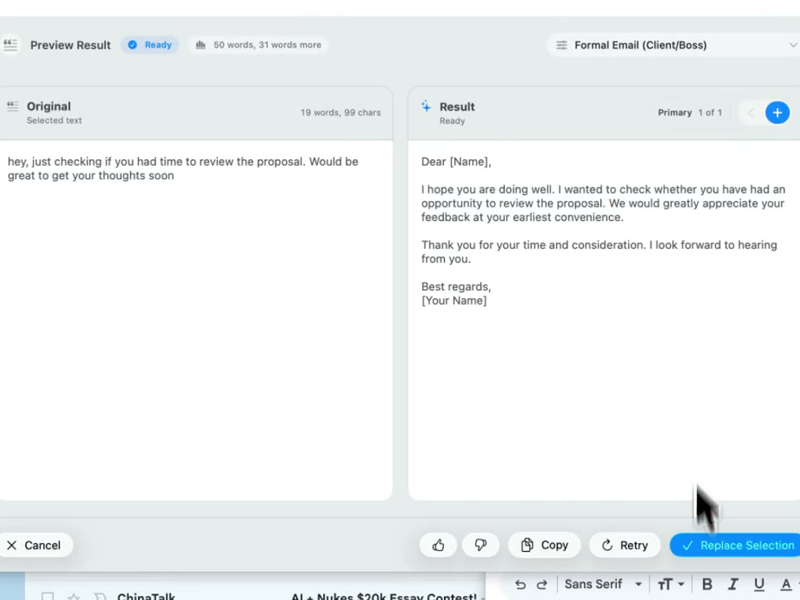
Run this shortcut without leaving the app where you are writing.
Run this shortcut without leaving the app where you are writing.
Run this shortcut without leaving the app where you are writing.
Choose a shortcut, review the rewrite, and replace the selected text without leaving your app.
Choose a shortcut, review the rewrite, and replace the selected text without leaving your app.
Choose a shortcut, review the rewrite, and replace the selected text without leaving your app.
Public reply on an urgent ticket — checkout is failing
Cmd/Ctrl Shift PBefore
hi, so engineering is aware and they're rolling back the payment provider change from last week, will update you when I hear something, sorry for the trouble
After
You're right to flag this as urgent, and we're treating it that way. Engineering has traced the failures to last week's payment-provider change and is rolling it back now. I'll post an update on this ticket as soon as the rollback completes.
A 2023-era password-reset macro that needs a refresh
Cmd/Ctrl Shift PBefore
Please navigate to the Settings page and click 'Reset Password'. You will receive an email shortly. If you do not receive the email, please check your spam folder. Please do not hesitate to reach out if you have any further questions!
After
Fastest way back in: go to Settings, choose Reset Password, and check your inbox for the link — spam folder too, if it hasn't arrived in a couple of minutes. Still locked out after that? Reply here and I'll dig in right away.
Internal note handing a double-charge ticket to Tier 2
Cmd/Ctrl Shift PBefore
customer upset about a double charge, checked stripe, two charges same amount june 3 and june 4, they want a refund asap, I already told them we'd sort it today, please handle
After
Handoff summary: customer was charged twice — same amount, June 3 and June 4, confirmed in Stripe. They've been promised a resolution today. Needed from Tier 2: refund the duplicate charge and confirm to the customer on this ticket.
Start with 30 free rewrites a month. Pro adds unlimited rewrites for one writer. Team adds shared shortcuts, workflows, and company context.
For trying the workflow
Select, rewrite, and replace text in any app, with 30 rewrites each month.
For one active writer
$15 billed monthly
Unlimited rewrites for your own styles, workflows, and dictation.
For shared voice and policy
$25 billed monthly. Starts at 2 seats.
Your company's approved language, one hotkey away for everyone.
Rolling this out to a support or sales team? Run a 3-week pilot →
Every new account starts with a free 14-day Team trial: no card required, up to 10 trial seats, then Free plan limits unless you upgrade.
SSO/SCIM, audit logs, security review, and rollout help for 25+ seats.
FAQ
No — Rewrait works at the operating-system level, over Zendesk rather than inside it. Agents install the Mac or Windows desktop app, and it works in any text field in the agent workspace: public replies, internal notes, the macro editor in Admin Center, and help center articles. There is no marketplace app to install, no admin settings to change in Zendesk, and no Zendesk API token to provision — Rewrait reads only the text an agent selects, at the moment they press Cmd/Ctrl+Shift+P. That has two practical consequences. First, rollout requires the desktop app for each agent, with no Zendesk marketplace installation or API setup. Second, the same tool keeps working when agents step outside Zendesk — the follow-up email, the Slack thread with engineering, the help-center rewrite — so your team's voice doesn't stop at the ticket boundary.
Neither — it sits in the gap between them. Zendesk's AI features handle triage, deflection, and summarization inside the platform (agent copilot add-ons run around $50 per agent per month). Macros handle the repeatable answer. Rewrait is the layer for what your agents actually type: the reply that starts from a macro but needs this customer's details, the de-escalation that can't sound canned, the answer that exists in an agent's head but comes out tangled. The stale-macro problem is the clearest case: insert the macro, select it, press the hotkey, and rewrite it to fit the customer's tone and situation — current, specific, still on-voice. Keep Zendesk AI for volume and macros for structure. Rewrait helps agents make human-written messages clear, specific, and consistent with your support voice.
With workspace styles on the Team plan. A support lead creates shared styles — say, Support reply, De-escalation, and Tier 2 handoff — and every agent gets them under the same hotkey. Styles can pull from approved company context: connect Notion, Confluence, or Google Docs, whitelist your voice guide and product docs, and rewrites match your terminology instead of generic AI politeness. The workspace owner manages seats and billing centrally; agents just install the app and write. Team is $20 per seat per month billed annually ($25 monthly), starts at 2 seats, and includes a no-training guarantee covering workspace text. Every signup starts with a 14-day free trial of Team — no card required — which is enough time to put real styles in front of a pilot group of agents and compare a week of replies before paying anything.
Only the text an agent selects, only when they trigger a rewrite. Rewrait is not a browser extension and does not scrape the page: it has no access to the rest of the ticket, the requester profile, or your Zendesk instance. Selections are processed on demand and never used to train models, and rewrite history is off by default — unless someone opts in, no copy of the text is kept. On the Team plan that is backed by a contractual no-training guarantee for the workspace. Context integrations (Notion, Confluence, Google Docs) use read-only scopes and encrypted tokens, and the workspace owner approves the specific documents used. If your security policy blocks agents from pasting ticket text into external chat tools, Rewrait offers a more controlled workflow: it processes only selected text, history is off by default, and Team includes a contractual no-training guarantee.
Select your draft, run a shortcut, and review the rewrite before replacing it.