
Emails you'd rather say than type
Run this shortcut without leaving the app where you are writing.
Voice Dictation
Voice to email without the raw transcript. Dictate a rough draft in English, Spanish, Portuguese, French, or German, then use Rewrait to turn it into a message you can review and send.
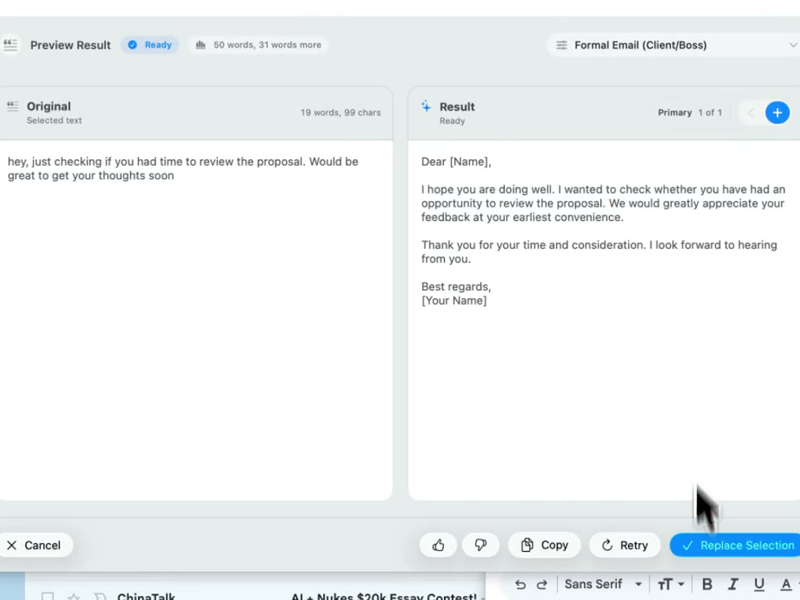
Run this shortcut without leaving the app where you are writing.
Run this shortcut without leaving the app where you are writing.
Run this shortcut without leaving the app where you are writing.
Choose a shortcut, review the rewrite, and replace the selected text without leaving your app.
Choose a shortcut, review the rewrite, and replace the selected text without leaving your app.
Choose a shortcut, review the rewrite, and replace the selected text without leaving your app.
Client reply, dictated between meetings — "Professional email" shortcut
Cmd/Ctrl Shift PBefore
um so basically tell her the new designs are done we just didn't get to the mobile screens yet because the api thing ate our week and ask if it's ok if we show everything together on thursday instead of sending half now
After
Hi Priya — the new designs are ready. The mobile screens aren't finished yet (an API issue took most of our week), so rather than sending half now, I'd like to walk you through everything together on Thursday. Does that still work for you?
Dictated in Portuguese on the commute — "English business email" shortcut
Cmd/Ctrl Shift PBefore
então fala pra ele que o deploy atrasou por causa da migração do banco a gente precisa de mais um dia e que o ambiente de teste já vai estar pronto na quarta de manhã sem falta
After
Quick update: the deploy slipped by one day due to a database migration issue. The test environment will be ready by Wednesday morning without fail — I'll confirm as soon as it's live.
Post-call note for the CRM — "Call summary" shortcut
Cmd/Ctrl Shift PBefore
ok note for the acme account she's annoyed the discount didn't apply again third time um i promised a credit on this month's invoice and billing needs to figure out why the coupon keeps falling off before the next cycle july first
After
Acme — call summary: the renewal discount failed to apply for the third time, and the customer is understandably frustrated. I've promised a credit on this month's invoice. Action for Billing: find out why the coupon keeps detaching, before the next cycle on July 1.
Start with 30 free rewrites a month. Pro adds unlimited rewrites for one writer. Team adds shared shortcuts, workflows, and company context.
For trying the workflow
Select, rewrite, and replace text in any app, with 30 rewrites each month.
For one active writer
$15 billed monthly
Unlimited rewrites for your own styles, workflows, and dictation.
For shared voice and policy
$25 billed monthly. Starts at 2 seats.
Your company's approved language, one hotkey away for everyone.
Rolling this out to a support or sales team? Run a 3-week pilot →
Every new account starts with a free 14-day Team trial: no card required, up to 10 trial seats, then Free plan limits unless you upgrade.
SSO/SCIM, audit logs, security review, and rollout help for 25+ seats.
FAQ
Dictate the reply the way you'd explain it out loud — half-sentences, filler words, and backtracking are all fine — then select the transcript, press Cmd/Ctrl+Shift+P, and pick a shortcut like "Professional email." Rewrait rewrites the rambling transcript into a structured message right where your cursor is; review it, optionally flip between Warmer, Shorter, and More direct variants, and send. You review a rewritten message rather than sending the raw transcript. Speech-to-text alone can leave you with filler, repetition, and a buried ask. The rewrite step cleans up the transcript before you send it. And because Rewrait is a native layer on Mac and Windows rather than an email plugin, the same flow works in Gmail, Outlook, Slack, and your support desk.
Yes — dictation language and output language are independent. Rewrait transcribes English, Spanish, Portuguese, French, and German, plus an automatic multilingual mode for people who switch languages mid-thought; you set the preference once in settings. The rewrite step then produces whatever the shortcut asks for: dictate your update in Portuguese, run an "English business email" shortcut, and the polished result comes out in English. Multilingual professionals can speak in the language they think in and send the result in the language their recipient expects. On Pro and Team plans transcription runs on Deepgram's nova-3 multilingual model; the Free plan includes basic dictation, enough to test the flow before upgrading.
Dictation apps solve transcription. Tools such as Wispr Flow focus on turning speech into clean, well-formatted text. A spoken draft can still ramble, repeat itself, or bury the ask. Rewrait adds saved rewriting shortcuts, tone variants (Warmer, Shorter, More direct), and, on Team plans, your company's shared styles and approved context documents. If you only want speech-to-text, a dedicated dictation app may be the better choice. If you want to talk for 30 seconds and send something polished, transcription is half the job.
No. The Free plan ($0) includes basic dictation and 30 rewrites a month at up to 1,000 characters — enough to test the dictate-then-rewrite flow on real messages. Pro costs $12/mo billed annually ($144/yr) or $15 monthly. It upgrades transcription to Deepgram's nova-3 multilingual model and adds unlimited rewrites, a 10,000-character limit, premium rewrite models, and API access. Team ($20/seat/mo billed annually, $25 monthly, starting at 2 seats) adds shared workspace styles and approved company sources, so a dictated draft gets rewritten in your team's voice rather than a generic one. Every new account also starts with a 14-day Team trial — full features, no card — which is the right way to judge transcription quality on your own accent, vocabulary, and language before paying anything.
Select your draft, run a shortcut, and review the rewrite before replacing it.