
Client emails that sound native
Run this shortcut without leaving the app where you are writing.
For Non-Native Speakers
Write in your English, or in Spanish, Portuguese, French, or German, and get natural English back in Slack, Gmail, Teams, or any app on Mac and Windows. You review every change before it replaces your text.
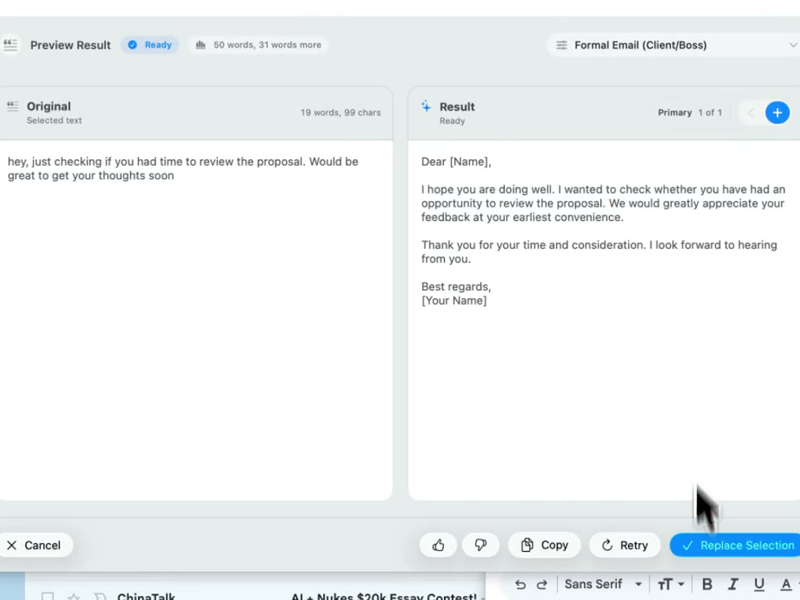
Run this shortcut without leaving the app where you are writing.
Run this shortcut without leaving the app where you are writing.
Run this shortcut without leaving the app where you are writing.
Choose a shortcut, review the rewrite, and replace the selected text without leaving your app.
Choose a shortcut, review the rewrite, and replace the selected text without leaving your app.
Choose a shortcut, review the rewrite, and replace the selected text without leaving your app.
Email to a client in Gmail, written by a Spanish speaker: Formal Email style
Cmd/Ctrl Shift PBefore
Dear Mr. Lee, I write you for inform that the delivery will have a delay of two days because we had a problem with the supplier. We remain attentive to any doubt.
After
Dear Mr. Lee, I wanted to let you know that the delivery will be two days late because of an issue with our supplier. Please let me know if you have any questions.
Slack message typed in Portuguese: a personal style that writes in English
Cmd/Ctrl Shift PBefore
Oi pessoal, o deploy de hoje vai atrasar uma hora porque os testes falharam. Aviso quando estiver pronto.
After
Hi all, today's deploy is running about an hour late because the tests failed. I'll let you know when it's done.
Teams message to a manager, written by a German speaker: Soften Tone style
Cmd/Ctrl Shift PBefore
I need the budget numbers until Wednesday. Without them I cannot finish the plan.
After
Could you send me the budget numbers by Wednesday? I need them to finish the plan.
Start with 30 free rewrites a month. Pro adds unlimited rewrites for one writer. Team adds shared shortcuts, workflows, and company context.
For trying the workflow
Select, rewrite, and replace text in any app, with 30 rewrites each month.
For one active writer
$15 billed monthly
Unlimited rewrites for your own styles, workflows, and dictation.
For shared voice and policy
$25 billed monthly. Starts at 2 seats.
Your company's approved language, one hotkey away for everyone.
Rolling this out to a support or sales team? Run a 3-week pilot →
Every new account starts with a free 14-day Team trial: no card required, up to 10 trial seats, then Free plan limits unless you upgrade.
SSO/SCIM, audit logs, security review, and rollout help for 25+ seats.
FAQ
It depends on where you write. Grammarly is strong at underlining mistakes as you type. DeepL Write polishes text you paste into its editor. ChatGPT can rewrite anything, but you copy the text into a chat window and back. Apple's Writing Tools are free on Apple Silicon Macs. Rewrait is built for people who write English at work all day across many apps: you select the text where you wrote it, press Cmd+Shift+P (Ctrl+Shift+P on Windows), check the natural English version next to your draft, and replace it in place. It also accepts input in Spanish, Portuguese, French, or German, drafts replies from what is on screen, and learns your corrections if you turn learning on. It runs on Mac and Windows, with a free plan of 30 rewrites a month.
Three habits make the biggest difference. First, avoid phrases translated word for word: "We remain attentive to your comments" is correct but sounds foreign; "Let me know if you have any questions" is what a native colleague writes. Second, soften requests: "Send me the report" can read as an order in English, while "Could you send me the report?" reads as polite. Third, watch false friends such as "actually" (in fact, not currently) and "eventually" (in the end, not possibly). Rewrait applies all three for you: select the email, press the shortcut, and compare your draft with a natural English version before you replace it.
Yes. You can dictate in Spanish, Portuguese, French, German, or English, and choose a style that writes in English, so what you say becomes a clear English message you review before inserting. For typed text, save a personal style with an instruction such as "Write the result in natural, professional English," then select your draft in any language and run that style. The built-in styles keep the language you wrote in, so they are useful when you want to polish Spanish or Portuguese without translating it.
It keeps your facts, names, numbers, dates, links, and @mentions, and changes only the wording. You always see your draft and the result side by side, with a Changes view that marks every edit, and you can edit the result, try again, or cancel before anything replaces your text. Styles let you choose the tone: casual for chat, polite for a request, formal for a client. If you correct a result, Rewrait can offer to remember that correction as a rule for next time, but only after you turn learning on and confirm the rule.
There is a free plan with 30 rewrites a month and 1,000 characters per rewrite, which is enough to try it on real emails and messages. Every new account also starts with 14 days of every feature, with no card required, and then stays on the Free plan unless you upgrade. Pro costs $12 per month billed annually, or $15 monthly, and adds unlimited rewrites, premium models, longer texts, and Warmer, Shorter, and More direct versions of each rewrite. You can also try a rewrite on the rewrait.com homepage without installing anything.
Select your draft, run a shortcut, and review the rewrite before replacing it.